Payments
The following section refers to APIs related to receiving payments from your customers.
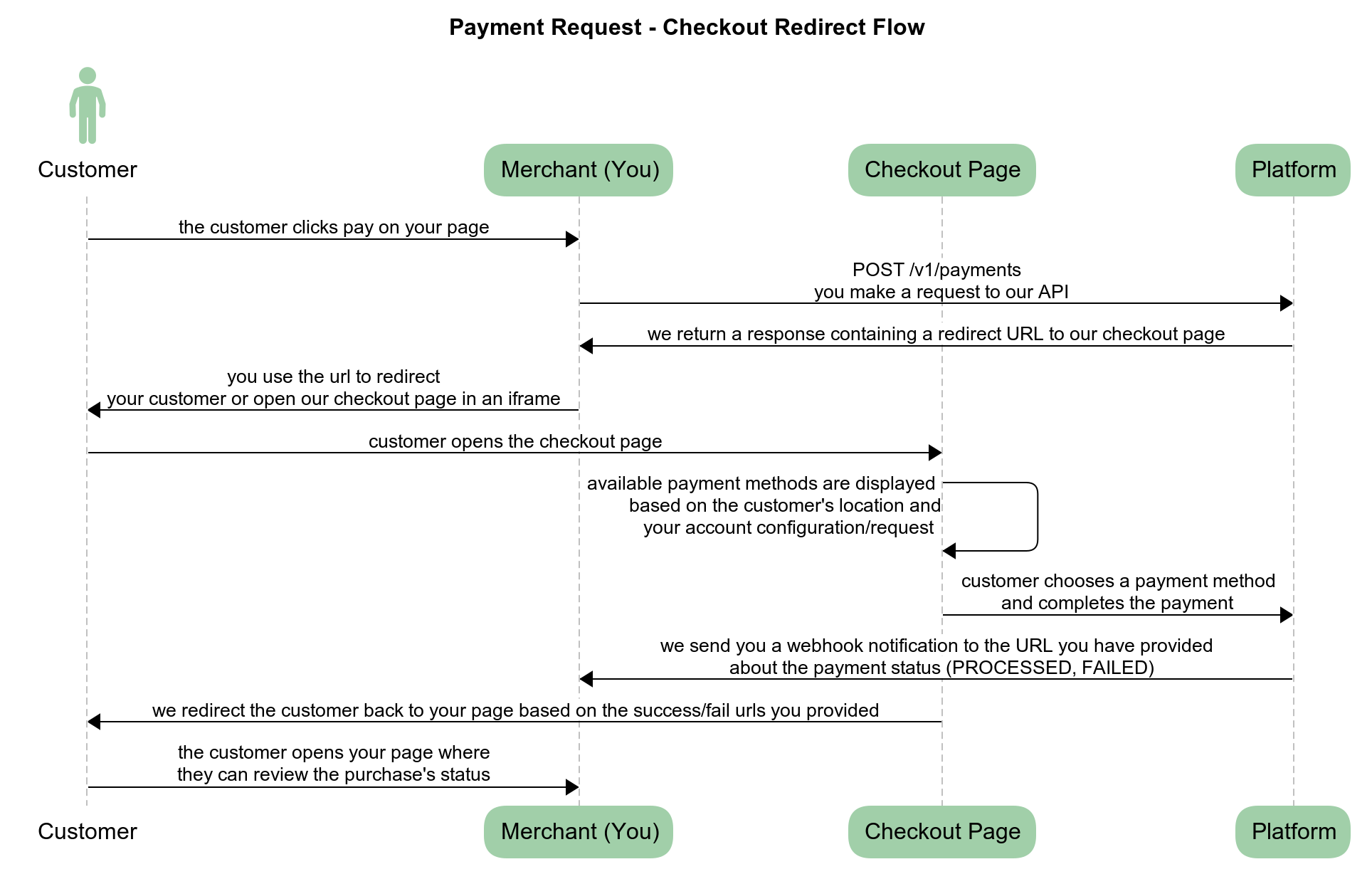
When you create a Payment Request we will generate a temporary redirect link containing a unique one-time token which you can use to redirect your customer to our checkout page where they can select a variety of local and international payment methods in order to complete the payment.
Once the payment is completed, failed or cancelled by the user, we will send a notification (webhook) to your server, after which we will redirect the customer back to your page if you provided a success/fail URL.
If the payment is successful then the funds will be credited to your account balance.
You can review your balances and payment transactions from the merchant dashboard or using the API.
The below diagram provides a basic overview regarding the Payment checkout flow.
Create Payment Request
POST /v1/payments
Create a request for payment from one of your customers
Redirect the customer to the returned redirectUrl. Status changes are sent to notificationUrl, see Webhooks.
Requires the X-Api-Key and X-Api-Secret headers.
Parameters
X-Signatureheader · stringSignature header containing request body signature. Signed using the signature key provided to the merchant. If SKIP_SIGNATURE_CHECK capability is enabled on the merchant account this parameter is not required and will not be validated
X-Signature-Key-Idheader · stringKey ID header used for signing request body If SKIP_SIGNATURE_CHECK capability is enabled on the merchant account this parameter is not required and will not be validated
Request body
Request body for the payment to be initiated
foreignTransactionIdrequired stringThe Merchant's unique identifier for each payment. Will be used in responses and notifications. Can be UUID, transaction ID, order ID or any Merchant-defined unique identifier. Cannot be used more than once for a Merchant Account.
amountrequired stringAmount of the payment, using a point as decimal separator. Sent as a string or a number
currencyrequired stringISO 4217 currency code
referencestringText shown on the customer's bank statement after the reference generated by the system, if the processor supports it. 1–100 characters: letters, digits, spaces and
- _ , # | .notificationUrlrequired string · uriHTTPS URL to which payment status notifications are sent, see Webhooks
successUrlstringURL to which the Customer will be redirected after a successful Payment. Overwrites the same default property for the Merchant Account. If this property is missing and there is no default property, the Customer won't be redirected, after showing The Kingdom Bank's success page.
failUrlstringURL to which the Customer will be redirected when a Payment does not succeed. Overwrites the same default property for the Merchant Account. On failure, if this property is missing and there is no default property, the Customer would be redirected to the successUrl (or, if missing, the default successUrl property), after showing The Kingdom Bank's failure page. Also, if the latter are not defined, the Customer won't be redirected at all.
returnUrlstringURL to which the Customer will be redirected if they click the 'Back to merchant' button on the checkout.
merchantWebsiteUrlstringThe Merchant's website URL. Stored on the transaction for customer support and reporting purposes.
externalUserIdstringAn optionally provided Merchant's unique identifier of the Customer; can be numeric ID, email, username, etc.). Will be returned in notifications.
customerPaymentRequestCustomerMerchant's customer data
Show fields
emailstringThe Customer's email in case it's needed for the payment. Can be used when initializing payment depending on provider requirements.
firstNamestringThe Customer's first name in case it's needed for the payment. Can be used when initializing payment depending on provider requirements.
lastNamestringThe Customer's last name in case it's needed for the payment. Can be used when initializing payment depending on provider requirements.
phonestringThe Customer's phone number in case it's needed for the payment. Can be used when initializing payment depending on provider requirements.
dateOfBirthstringThe Customer's date of birth in case it's needed for the payment. Can be used when initializing payment depending on provider requirements.
addressLine1stringThe Customer's address in case it's needed for the payment. Can be used when initializing payment depending on provider requirements.
addressLine2stringThe Customer's address in case it's needed for the payment. Can be used when initializing payment depending on provider requirements.
documentTypestringThe Customer's document type in case it's needed for the payment. Can be used when initializing payment depending on provider requirements.
documentIdstringThe Customer's document id in case it's needed for the payment. Can be used when initializing payment depending on provider requirements.
postalCodestringThe customer's postal code, if the payment method needs it. Up to 30 characters
swiftCodestringThe Customer's swift code in case it's needed for the payment. Can be used when initializing payment depending on provider requirements.
citystringThe Customer's city. Can be used when initializing payment depending on provider requirements.
statestringThe Customer's state. Can be used when initializing payment depending on provider requirements.
countrystringThe Customer's country. Can be used when initializing payment depending on provider requirements.
languagestringAn optionally provided preferred language code
mobileNetworkstringThe Customer's mobile network. Can be used when initializing payment depending on provider requirements.
allowedPaymentMethodsarray of stringOnly these payment methods are shown on the checkout page; with a single method it is preselected. Omit to show all methods enabled on your account. Not allowed with
paymentMethodFlowDIRECT, useselectedPaymentMethodinsteadAllowed values:
PIXCRYPTOBANKWIREINTERACINSTANT_BANK_TRANSFERPAGO_EFECTIVO_BANKJETON_CASHKINGDOM_WALLETPERFECT_MONEYMONET_PAY_BANKMONET_PAY_CASHCASH_TO_CODEKINGDOM_CASHEFECTY_CASHPAYNET_CASHPAYCASH_CASHSPEIPSEQR_PAYMENTaccountIdinteger · int64ID of the currency account to receive the funds. Defaults to your primary account in
currencypaymentMethodFlowstringCHECKOUT(default) redirects the customer to the checkout page;DIRECTsends the request directly to the provider and returns the details needed to complete the payment.DIRECTrequiresselectedPaymentMethodAllowed values:
CHECKOUTDIRECTselectedPaymentMethodstringThe payment method to use. Required when
paymentMethodFlowisDIRECT, and the method must support the direct flow; withCHECKOUTit skips the payment method selection on the checkout pageShow fields
Key of the payment method
paymentMethodDetailsPaymentMethodDetailsPayment method details
Show fields
instantBankTransferInstantBankTransferMethodDetailsPayment method details for Direct IBT
Show fields
bankChoiceIdstringBankChoiceId of the selected bank
itemsarray of PaymentRequestItemDescription of items that are object of the sale
Show fields
namerequired stringdescriptionrequired stringquantityrequired numberunitPricerequired numbercurrencyrequired stringdiscountAmountnumbertotalAmountnumbervatRatenumbervatAmountnumberimageUrlstringimageBase64stringskustringproductUrlstring
destinationDestinationBankAccountBeneficiary bank account for the payment. Only accepted when the
ALLOW_DESTINATION_ACCOUNT_IN_REQUESTcapability is enabled on your account, with exactly one allowed payment method (INSTANT_BANK_TRANSFERwhen none is given).holderNameis requiredShow fields
ibanstringinterBankAccountCodestringbicSwiftstringaccountNumberstringbankCodestringbankNamestringbranchCodestringaccountTypestringholderNamestringdocumentIdstringdocumentTypestringTypes of domestic national identifiers
Allowed values:
AR_CUIT_CUILAR_CUILAR_CUITAR_DNIBR_CPFBR_CNPJCL_RUTCL_RUNCL_PASSCL_CEPE_DNIPE_RUCPE_CEPE_PASSPK_PASSPK_CNICPK_SNICPK_NTNCO_PASSCO_NATIONAL_IDCO_RESIDENT_IDCO_RUTCO_TIEC_CEDULAEC_PASSEC_RUCMX_INEMX_CURPMX_RFCMX_PASSTR_TCKNAU_DRIVERSAU_ID_CARDAU_PASSUNKNOWNcountryrequired string
sourceSourceBankAccountSender bank account details, if available. Enforces that the payment is made from this account
Show fields
ibanstringaccountNumberstringsortCodestringbicSwiftstringbankCodestringbranchCodestringaccountTypestringholderNamestringcountrystring
selectedBicstringBank BIC code when is preselected by merchant's customer before initiating payments
bankInstitutionKeystringIdentifier of the customer's bank, from Supported Banks. Requires
customer.countrygenerateInvoicebooleanGenerate an invoice for the payment. Requires
items,customer.emailandcustomer.country
Responses
201 Payment created
externalTransactionIdrequired stringYour
foreignTransactionIdfrom the requestrequestIdrequired stringIdentifier of the payment request in The Kingdom Bank's system
timestamprequired string · date-timeTime the request was created (RFC 3339)
validUntilrequired string · date-timeUntil when
redirectUrlis valid (RFC 3339)redirectUrlrequired string · uriURL to redirect the customer to in order to complete the payment
qrCodestring · byteredirectUrlas a Base64-encoded QR code imagehostedQrPageUrlstring · uriURL of a page showing the QR code for completing the payment
400 The request is malformed or failed validation
traceIdstringtimestampstringcodeinteger · int32messagestringcausearray of ValidationCauseShow fields
fieldstringcausestringcauseKeystring
401 Missing or invalid API credentials, or invalid request signature
traceIdstringtimestampstringcodeinteger · int32messagestringcausearray of ValidationCauseShow fields
fieldstringcausestringcauseKeystring
409 The request conflicts with the merchant setup or the current state of the resource
traceIdstringtimestampstringcodeinteger · int32messagestringcausearray of ValidationCauseShow fields
fieldstringcausestringcauseKeystring
429 Rate limit exceeded
traceIdstringtimestampstringcodeinteger · int32messagestringcausearray of ValidationCauseShow fields
fieldstringcausestringcauseKeystring
500 Unexpected error
traceIdstringtimestampstringcodeinteger · int32messagestringcausearray of ValidationCauseShow fields
fieldstringcausestringcauseKeystring
Callbacks
Payment notification
POST notificationUrl
Sent to the request's notificationUrl whenever the transaction changes status. Answer with any 2xx status within 20 seconds, otherwise the notification is retried. The body is signed: check X-Signature against the raw body, see Webhooks.
Headers
X-Signaturerequired header · stringSignature of the raw body
X-Signature-Key-Idrequired header · stringKey ID of the Signature Key used
Body
notificationIdrequired integer · int64Identifier of the notification. A resent notification keeps the same
notificationIdforeignTransactionIdstringYour unique identifier, as sent with the request this notification is for
typerequired stringThe kind of transaction this notification is for
Allowed values:
PAYMENTREFUNDPAYOUTEXTERNAL_TRANSFERINTERNAL_TRANSFERrequestIdinteger · int64ID of the request (payment request, refund, payout or transfer) in The Kingdom Bank's system
transactionIdinteger · int64ID of the The Kingdom Bank transaction that affected your account. Different from
requestIdpaymentMethodstringPayment method of the request
timestamprequired stringTime of the event this notification is for, in RFC 3339 format
statusrequired stringStatus of the transaction
PENDING: Pending confirmation from the customer. The payment may or may not be processedSCHEDULED: The customer has instructed the payment but the money has not yet reached our settlement account, so it is not yet added to your balancePROCESSED: Completed. The money has been added to (or deducted from) your account balanceFAILED: Failed, cancelled by the customer or our backoffice, or timed outOVERPAID,UNDERPAID: Deprecated. Use theoverpaidandunderpaidflags insteadAllowed values:
PENDINGSCHEDULEDPROCESSEDFAILEDOVERPAIDUNDERPAIDunderpaidbooleanThe customer completed the payment, but paid less than the requested amount
overpaidbooleanThe customer completed the payment, but paid more than the requested amount
referencestringPayment reference: the reference generated by the system followed by the one sent with the request, separated by a space
requestAmountstringRequested amount, as a decimal string
requestCurrencystringISO 4217 currency code of
requestAmounttransactionAmountstringAmount added to or deducted from your account. Same as
requestAmountunless otherwise agreed with your integration managertransactionCurrencystringISO 4217 currency code of
transactionAmountpaidAmountstringAmount paid to you. May differ from
requestAmountafter rounding or conversionpaidCurrencystringISO 4217 currency code of
paidAmountprocessingAmountstringAmount that was processed. Crypto payments only
processingCurrencystringCurrency of
processingAmount. Crypto payments onlycustomerAmountstringAmount paid by the customer, before conversion
customerCurrencystringCurrency of
customerAmountexternalUserIdstringThe
externalUserIdsent with the requestoriginalTransactionIdinteger · int64ID of the original transaction. Refunds, chargebacks and other events derived from a transaction only
originalForeignTransactionIdstringforeignTransactionIdof the original transaction. Refunds, chargebacks and other events derived from a transaction onlycustomerPaymentNotificationCustomerDetails of the customer's (sender's) account, as obtained from the bank. Payments only
Show fields
bankHolderNamestringName of the account holder
ibanstringbicstringBIC/SWIFT of the bank
bankNamestringcountrystringISO 3166 alpha-3 country code of the account
accountNumberstringDomestic account number
bankCodestringDomestic bank code
branchCodestringDomestic branch code
typestringType of the account
currencystringISO 4217 currency code of the account
last4CharsstringLast 4 characters of the IBAN or account number
userIdstringUnique identifier of the customer
mobileNetworkstringMobile network. Mobile money payments only
errorPaymentNotificationErrorWhy the transaction failed or was cancelled. The money may still arrive, so don't treat it as final for payments with
manualCheckRecommendedShow fields
codestringError code, listed in the Errors guide
messagestring
feesarray of PaymentNotificationFeeFees applied to the transaction
Show fields
feeTypestringType of the fee
amountnumbercurrencystring
isRecurringbooleanThe payment is a recurring payment
isSubsequentbooleanThe payment is a subsequent payment of a recurring plan
recurringPlanIdinteger · int64ID of the recurring plan in The Kingdom Bank's system
onDemandTokenstringThe customer's on-demand token, to use when requesting subsequent on-demand payments
onDemandNotestringReason for the on-demand payment, as shown to the customer in the payment confirmation
manualCheckRecommendedbooleanThe payment failed, but may still have been paid. Check it manually before retrying
Expected response: 200 Any 2xx status acknowledges the notification; the body is ignored
Create Crypto Payment Request
POST /v1/payments/crypto
Create a request for a crypto payment from one of your customers
Instruct your customer to make a payment using the returned crypto address details
Wait for the webhook to know when the payment is received, see Webhooks
Requires the X-Api-Key and X-Api-Secret headers.
Parameters
X-Signatureheader · stringSignature header containing request body signature. Signed using the signature key provided to the merchant. If SKIP_SIGNATURE_CHECK capability is enabled on the merchant account this parameter is not required and will not be validated
X-Signature-Key-Idheader · stringKey ID header used for signing request body If SKIP_SIGNATURE_CHECK capability is enabled on the merchant account this parameter is not required and will not be validated
Request body
Request body for the manual crypto payment to be initiated
foreignTransactionIdrequired stringThe Merchant's unique identifier for each payment. Will be used in responses and notifications. Can be UUID, transaction ID, order ID or any Merchant-defined unique identifier. Cannot be used more than once for a Merchant Account.
amountrequired stringAmount without thousands separator and using a point (“.”) as a decimal separator. If the chosen currency does not support the number of digits after the decimal point, rounding half up will be used (eg. 1.234 EUR => 1.23 EUR, 1.235 EUR => 1.24 EUR)
paymentCurrencyrequired stringCryptocurrency the customer pays in: ADA, BTC, DOGE, ETH, SOL, USDC.ERC20, USDC.TRC20, USDT.ERC20, USDT.TRC20 or XRP
settlementCurrencyrequired stringCurrency settled into your account: one of the
paymentCurrencyvalues, or EURnotificationUrlstring · uriHTTPS URL to which payment status notifications are sent. Strongly recommended: without it you get no webhooks
externalUserIdstringAn optionally provided Merchant's unique identifier of the Customer; can be numeric ID, email, username, etc.). Will be returned in notifications.
accountIdinteger · int64An optionally provided account ID to which the Merchant has access. Will be used to determine the account used for the payment. Has to be numeric.
Responses
201 Crypto payment created
externalTransactionIdstringYour
foreignTransactionIdfrom the requestrequestIdstringIdentifier of the payment request in The Kingdom Bank's system
timestampstring · date-timeTime the request was created (RFC 3339)
amountTypestringAllowed values:
PAYMENTSETTLEMENTpaymentAmountnumberpaymentCurrencystringsettlementAmountnumbersettlementCurrencystringfxRatenumberfxRateWithMarkupnumberreferencestringReference the customer must enter on the bank transfer
bankAccountBankAccountBank account the customer must transfer to
Show fields
accountNumberstringAccount number or IBAN of the receiving account
bankNamestringName of the receiving bank
bankAddressstringbeneficiaryNamestringName of the beneficiary
beneficiaryAddressstringbeneficiaryCountrystringISO 3166-1 alpha-3 country of the beneficiary
bankCodestringswiftCodestringBIC/SWIFT code of the receiving bank
cryptoAddressCryptoAddressDetailsCrypto address the customer must pay to
Show fields
addressstringThe address of a crypto transaction
tagstringThe address tag of a crypto transaction
currencystringThe currency of a crypto transaction
expectedAmountnumberThe expected amount of a crypto transaction
400 The request is malformed or failed validation
traceIdstringtimestampstringcodeinteger · int32messagestringcausearray of ValidationCauseShow fields
fieldstringcausestringcauseKeystring
401 Missing or invalid API credentials, or invalid request signature
traceIdstringtimestampstringcodeinteger · int32messagestringcausearray of ValidationCauseShow fields
fieldstringcausestringcauseKeystring
409 The request conflicts with the merchant setup or the current state of the resource
traceIdstringtimestampstringcodeinteger · int32messagestringcausearray of ValidationCauseShow fields
fieldstringcausestringcauseKeystring
429 Rate limit exceeded
traceIdstringtimestampstringcodeinteger · int32messagestringcausearray of ValidationCauseShow fields
fieldstringcausestringcauseKeystring
500 Unexpected error
traceIdstringtimestampstringcodeinteger · int32messagestringcausearray of ValidationCauseShow fields
fieldstringcausestringcauseKeystring
Callbacks
Payment notification
POST notificationUrl
Sent to the request's notificationUrl whenever the transaction changes status. Answer with any 2xx status within 20 seconds, otherwise the notification is retried. The body is signed: check X-Signature against the raw body, see Webhooks.
Headers
X-Signaturerequired header · stringSignature of the raw body
X-Signature-Key-Idrequired header · stringKey ID of the Signature Key used
Body
notificationIdrequired integer · int64Identifier of the notification. A resent notification keeps the same
notificationIdforeignTransactionIdstringYour unique identifier, as sent with the request this notification is for
typerequired stringThe kind of transaction this notification is for
Allowed values:
PAYMENTREFUNDPAYOUTEXTERNAL_TRANSFERINTERNAL_TRANSFERrequestIdinteger · int64ID of the request (payment request, refund, payout or transfer) in The Kingdom Bank's system
transactionIdinteger · int64ID of the The Kingdom Bank transaction that affected your account. Different from
requestIdpaymentMethodstringPayment method of the request
timestamprequired stringTime of the event this notification is for, in RFC 3339 format
statusrequired stringStatus of the transaction
PENDING: Pending confirmation from the customer. The payment may or may not be processedSCHEDULED: The customer has instructed the payment but the money has not yet reached our settlement account, so it is not yet added to your balancePROCESSED: Completed. The money has been added to (or deducted from) your account balanceFAILED: Failed, cancelled by the customer or our backoffice, or timed outOVERPAID,UNDERPAID: Deprecated. Use theoverpaidandunderpaidflags insteadAllowed values:
PENDINGSCHEDULEDPROCESSEDFAILEDOVERPAIDUNDERPAIDunderpaidbooleanThe customer completed the payment, but paid less than the requested amount
overpaidbooleanThe customer completed the payment, but paid more than the requested amount
referencestringPayment reference: the reference generated by the system followed by the one sent with the request, separated by a space
requestAmountstringRequested amount, as a decimal string
requestCurrencystringISO 4217 currency code of
requestAmounttransactionAmountstringAmount added to or deducted from your account. Same as
requestAmountunless otherwise agreed with your integration managertransactionCurrencystringISO 4217 currency code of
transactionAmountpaidAmountstringAmount paid to you. May differ from
requestAmountafter rounding or conversionpaidCurrencystringISO 4217 currency code of
paidAmountprocessingAmountstringAmount that was processed. Crypto payments only
processingCurrencystringCurrency of
processingAmount. Crypto payments onlycustomerAmountstringAmount paid by the customer, before conversion
customerCurrencystringCurrency of
customerAmountexternalUserIdstringThe
externalUserIdsent with the requestoriginalTransactionIdinteger · int64ID of the original transaction. Refunds, chargebacks and other events derived from a transaction only
originalForeignTransactionIdstringforeignTransactionIdof the original transaction. Refunds, chargebacks and other events derived from a transaction onlycustomerPaymentNotificationCustomerDetails of the customer's (sender's) account, as obtained from the bank. Payments only
Show fields
bankHolderNamestringName of the account holder
ibanstringbicstringBIC/SWIFT of the bank
bankNamestringcountrystringISO 3166 alpha-3 country code of the account
accountNumberstringDomestic account number
bankCodestringDomestic bank code
branchCodestringDomestic branch code
typestringType of the account
currencystringISO 4217 currency code of the account
last4CharsstringLast 4 characters of the IBAN or account number
userIdstringUnique identifier of the customer
mobileNetworkstringMobile network. Mobile money payments only
errorPaymentNotificationErrorWhy the transaction failed or was cancelled. The money may still arrive, so don't treat it as final for payments with
manualCheckRecommendedShow fields
codestringError code, listed in the Errors guide
messagestring
feesarray of PaymentNotificationFeeFees applied to the transaction
Show fields
feeTypestringType of the fee
amountnumbercurrencystring
isRecurringbooleanThe payment is a recurring payment
isSubsequentbooleanThe payment is a subsequent payment of a recurring plan
recurringPlanIdinteger · int64ID of the recurring plan in The Kingdom Bank's system
onDemandTokenstringThe customer's on-demand token, to use when requesting subsequent on-demand payments
onDemandNotestringReason for the on-demand payment, as shown to the customer in the payment confirmation
manualCheckRecommendedbooleanThe payment failed, but may still have been paid. Check it manually before retrying
Expected response: 200 Any 2xx status acknowledges the notification; the body is ignored
Create Manual Bank Transfer Request
POST /v1/payments/bank-transfer
Create a request for manual bank transfer payment from one of your customers
Instruct your customer to make a transfer using the returned bank details and reference
Wait for the webhook to know when the transfer is received, see Webhooks
settlementCurrency must currently equal paymentCurrency
Requires the X-Api-Key and X-Api-Secret headers.
Parameters
X-Signatureheader · stringSignature header containing request body signature. Signed using the signature key provided to the merchant. If SKIP_SIGNATURE_CHECK capability is enabled on the merchant account this parameter is not required and will not be validated
X-Signature-Key-Idheader · stringKey ID header used for signing request body If SKIP_SIGNATURE_CHECK capability is enabled on the merchant account this parameter is not required and will not be validated
Request body
Request body for the Manual Bank Transfer to be initiated
foreignTransactionIdrequired stringThe Merchant's unique identifier for each payment. Will be used in responses and notifications. Can be UUID, transaction ID, order ID or any Merchant-defined unique identifier. Cannot be used more than once for a Merchant Account.
amountrequired stringAmount without thousands separator and using a point (“.”) as a decimal separator. If the chosen currency does not support the number of digits after the decimal point, rounding half up will be used (eg. 1.234 EUR => 1.23 EUR, 1.235 EUR => 1.24 EUR)
paymentCurrencyrequired stringISO 4217 currency in which the payer makes the transfer
settlementCurrencyrequired stringCurrency settled into your account. Must currently equal
paymentCurrency. IfaccountIdis given, its currency must matchnotificationUrlstring · uriHTTPS URL to which payment status notifications are sent. Strongly recommended: without it you get no webhooks
externalUserIdstringAn optionally provided Merchant's unique identifier of the Customer; can be numeric ID, email, username, etc.). Will be returned in notifications.
accountIdinteger · int64An optionally provided account ID to which the Merchant has access. Will be used to determine the account used for the payment. Has to be numeric.
amountTyperequired stringPAYMENT:amountis what the payer transfers.SETTLEMENT:amountis what enters your accountAllowed values:
PAYMENTSETTLEMENTcustomerrequired PaymentRequestCustomerPayer details.
firstName,lastName,countryandaddressLine1are required;documentIdis required for CLPShow fields
emailstringThe Customer's email in case it's needed for the payment. Can be used when initializing payment depending on provider requirements.
firstNamestringThe Customer's first name in case it's needed for the payment. Can be used when initializing payment depending on provider requirements.
lastNamestringThe Customer's last name in case it's needed for the payment. Can be used when initializing payment depending on provider requirements.
phonestringThe Customer's phone number in case it's needed for the payment. Can be used when initializing payment depending on provider requirements.
dateOfBirthstringThe Customer's date of birth in case it's needed for the payment. Can be used when initializing payment depending on provider requirements.
addressLine1stringThe Customer's address in case it's needed for the payment. Can be used when initializing payment depending on provider requirements.
addressLine2stringThe Customer's address in case it's needed for the payment. Can be used when initializing payment depending on provider requirements.
documentTypestringThe Customer's document type in case it's needed for the payment. Can be used when initializing payment depending on provider requirements.
documentIdstringThe Customer's document id in case it's needed for the payment. Can be used when initializing payment depending on provider requirements.
postalCodestringThe customer's postal code, if the payment method needs it. Up to 30 characters
swiftCodestringThe Customer's swift code in case it's needed for the payment. Can be used when initializing payment depending on provider requirements.
citystringThe Customer's city. Can be used when initializing payment depending on provider requirements.
statestringThe Customer's state. Can be used when initializing payment depending on provider requirements.
countrystringThe Customer's country. Can be used when initializing payment depending on provider requirements.
languagestringAn optionally provided preferred language code
mobileNetworkstringThe Customer's mobile network. Can be used when initializing payment depending on provider requirements.
customerBankrequired PaymentRequestCustomerBankDetails of the payer's bank from which the transfer will be made
Show fields
namerequired stringaddressLine1required stringcityrequired stringstatestringApplicable for certain countries)
countryrequired stringCan be used when initializing payment depending on provider requirements.
Responses
201 Manual bank transfer request created
externalTransactionIdstringYour
foreignTransactionIdfrom the requestrequestIdstringIdentifier of the payment request in The Kingdom Bank's system
timestampstring · date-timeTime the request was created (RFC 3339)
amountTypestringAllowed values:
PAYMENTSETTLEMENTpaymentAmountnumberpaymentCurrencystringsettlementAmountnumbersettlementCurrencystringfxRatenumberfxRateWithMarkupnumberreferencestringReference the customer must enter on the bank transfer
bankAccountBankAccountBank account the customer must transfer to
Show fields
accountNumberstringAccount number or IBAN of the receiving account
bankNamestringName of the receiving bank
bankAddressstringbeneficiaryNamestringName of the beneficiary
beneficiaryAddressstringbeneficiaryCountrystringISO 3166-1 alpha-3 country of the beneficiary
bankCodestringswiftCodestringBIC/SWIFT code of the receiving bank
cryptoAddressCryptoAddressDetailsCrypto address the customer must pay to
Show fields
addressstringThe address of a crypto transaction
tagstringThe address tag of a crypto transaction
currencystringThe currency of a crypto transaction
expectedAmountnumberThe expected amount of a crypto transaction
400 The request is malformed or failed validation
traceIdstringtimestampstringcodeinteger · int32messagestringcausearray of ValidationCauseShow fields
fieldstringcausestringcauseKeystring
401 Missing or invalid API credentials, or invalid request signature
traceIdstringtimestampstringcodeinteger · int32messagestringcausearray of ValidationCauseShow fields
fieldstringcausestringcauseKeystring
409 The request conflicts with the merchant setup or the current state of the resource
traceIdstringtimestampstringcodeinteger · int32messagestringcausearray of ValidationCauseShow fields
fieldstringcausestringcauseKeystring
429 Rate limit exceeded
traceIdstringtimestampstringcodeinteger · int32messagestringcausearray of ValidationCauseShow fields
fieldstringcausestringcauseKeystring
500 Unexpected error
traceIdstringtimestampstringcodeinteger · int32messagestringcausearray of ValidationCauseShow fields
fieldstringcausestringcauseKeystring
Callbacks
Payment notification
POST notificationUrl
Sent to the request's notificationUrl whenever the transaction changes status. Answer with any 2xx status within 20 seconds, otherwise the notification is retried. The body is signed: check X-Signature against the raw body, see Webhooks.
Headers
X-Signaturerequired header · stringSignature of the raw body
X-Signature-Key-Idrequired header · stringKey ID of the Signature Key used
Body
notificationIdrequired integer · int64Identifier of the notification. A resent notification keeps the same
notificationIdforeignTransactionIdstringYour unique identifier, as sent with the request this notification is for
typerequired stringThe kind of transaction this notification is for
Allowed values:
PAYMENTREFUNDPAYOUTEXTERNAL_TRANSFERINTERNAL_TRANSFERrequestIdinteger · int64ID of the request (payment request, refund, payout or transfer) in The Kingdom Bank's system
transactionIdinteger · int64ID of the The Kingdom Bank transaction that affected your account. Different from
requestIdpaymentMethodstringPayment method of the request
timestamprequired stringTime of the event this notification is for, in RFC 3339 format
statusrequired stringStatus of the transaction
PENDING: Pending confirmation from the customer. The payment may or may not be processedSCHEDULED: The customer has instructed the payment but the money has not yet reached our settlement account, so it is not yet added to your balancePROCESSED: Completed. The money has been added to (or deducted from) your account balanceFAILED: Failed, cancelled by the customer or our backoffice, or timed outOVERPAID,UNDERPAID: Deprecated. Use theoverpaidandunderpaidflags insteadAllowed values:
PENDINGSCHEDULEDPROCESSEDFAILEDOVERPAIDUNDERPAIDunderpaidbooleanThe customer completed the payment, but paid less than the requested amount
overpaidbooleanThe customer completed the payment, but paid more than the requested amount
referencestringPayment reference: the reference generated by the system followed by the one sent with the request, separated by a space
requestAmountstringRequested amount, as a decimal string
requestCurrencystringISO 4217 currency code of
requestAmounttransactionAmountstringAmount added to or deducted from your account. Same as
requestAmountunless otherwise agreed with your integration managertransactionCurrencystringISO 4217 currency code of
transactionAmountpaidAmountstringAmount paid to you. May differ from
requestAmountafter rounding or conversionpaidCurrencystringISO 4217 currency code of
paidAmountprocessingAmountstringAmount that was processed. Crypto payments only
processingCurrencystringCurrency of
processingAmount. Crypto payments onlycustomerAmountstringAmount paid by the customer, before conversion
customerCurrencystringCurrency of
customerAmountexternalUserIdstringThe
externalUserIdsent with the requestoriginalTransactionIdinteger · int64ID of the original transaction. Refunds, chargebacks and other events derived from a transaction only
originalForeignTransactionIdstringforeignTransactionIdof the original transaction. Refunds, chargebacks and other events derived from a transaction onlycustomerPaymentNotificationCustomerDetails of the customer's (sender's) account, as obtained from the bank. Payments only
Show fields
bankHolderNamestringName of the account holder
ibanstringbicstringBIC/SWIFT of the bank
bankNamestringcountrystringISO 3166 alpha-3 country code of the account
accountNumberstringDomestic account number
bankCodestringDomestic bank code
branchCodestringDomestic branch code
typestringType of the account
currencystringISO 4217 currency code of the account
last4CharsstringLast 4 characters of the IBAN or account number
userIdstringUnique identifier of the customer
mobileNetworkstringMobile network. Mobile money payments only
errorPaymentNotificationErrorWhy the transaction failed or was cancelled. The money may still arrive, so don't treat it as final for payments with
manualCheckRecommendedShow fields
codestringError code, listed in the Errors guide
messagestring
feesarray of PaymentNotificationFeeFees applied to the transaction
Show fields
feeTypestringType of the fee
amountnumbercurrencystring
isRecurringbooleanThe payment is a recurring payment
isSubsequentbooleanThe payment is a subsequent payment of a recurring plan
recurringPlanIdinteger · int64ID of the recurring plan in The Kingdom Bank's system
onDemandTokenstringThe customer's on-demand token, to use when requesting subsequent on-demand payments
onDemandNotestringReason for the on-demand payment, as shown to the customer in the payment confirmation
manualCheckRecommendedbooleanThe payment failed, but may still have been paid. Check it manually before retrying
Expected response: 200 Any 2xx status acknowledges the notification; the body is ignored